
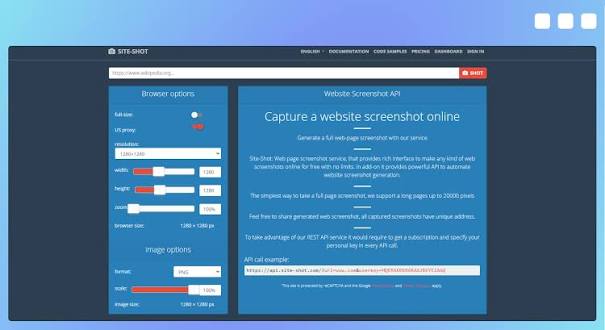
Capturing screenshots of websites may seem like a simple task when done manually, but it becomes much more complicated when hundreds or thousands of pages need to be recorded regularly. Businesses, developers, marketers, researchers, and SEO professionals often need reliable visual copies of web pages for monitoring, reporting, testing, documentation, and analysis. A website screenshot API provides an efficient way to automate this process without requiring users to open browsers and capture images one page at a time.
By connecting an application to a screenshot API, teams can request website images programmatically. The API loads a specified URL, renders the page, captures the desired view, and returns an image that can be stored or processed automatically. This approach saves time while making large-scale web capture more consistent.
Understanding Website Screenshot APIs
A website screenshot API is a service that allows software applications to generate screenshots of web pages through API requests. Instead of manually visiting a website and using a screenshot tool, a developer can send a URL and selected parameters to an API.
Depending on the service, parameters may include screen size, full-page capture, image format, delay before capture, device type, and other rendering options. The resulting screenshot can then be saved to a database, cloud storage system, reporting platform, or internal application.
This automated approach is particularly useful for applications that need screenshots repeatedly. For example, a website monitoring platform could automatically capture a homepage every day and compare the latest image with an earlier version.
Why Automated Web Capture Matters
Manual screenshots are practical for occasional tasks, but they become inefficient as the number of pages increases. A person may need several minutes to open a page, wait for it to load, adjust the browser window, capture the image, rename the file, and organize it.
Automation removes most of these repetitive steps. A website screenshot API can process URLs according to predefined instructions, allowing hundreds of captures to be generated with minimal manual involvement.
Automated screenshots can support website audits, competitive research, visual regression testing, content verification, and digital archiving. They can also provide useful evidence of how a page appeared at a particular time.
Simplifying SEO and Search Data Workflows
SEO professionals frequently work with large amounts of search-related information. They may monitor search results, review competitor pages, track changes, and prepare reports for clients. Combining screenshot capabilities with search data workflows can make these activities more efficient.
For example, a team using serp api for search-related data can collect URLs from search results and then use a screenshot API to capture selected pages automatically. This creates a workflow in which search information and visual page records can be processed together.
Rather than manually opening every result, a system can identify relevant URLs, request screenshots, and organize the images according to keywords, dates, domains, or campaigns. This can be especially helpful for agencies managing multiple SEO projects.
Common Uses for Automated Website Screenshots
There are many practical applications for automated web capture. One of the most common is website monitoring. Companies can schedule screenshots of important pages and compare them over time. Significant visual changes may indicate redesigns, content updates, broken elements, or other modifications.
Another use is competitive analysis. Marketing teams can capture competitor landing pages and observe how their layouts, promotional messages, calls to action, and product presentations evolve.
Screenshots are also valuable for quality assurance. Developers can capture pages under different screen sizes and check whether responsive layouts work correctly. Automated visual testing can help identify unexpected changes before they reach users.
Digital archiving is another important application. Organizations may want to maintain visual records of public web pages for research, documentation, or historical reference.
How the Automation Process Works
The process generally begins with an application sending an API request containing a website URL. The screenshot service receives the request and opens the page using an automated browser environment.
The service then waits for the required content to load. Some pages contain images, scripts, animations, or dynamically generated elements, so appropriate rendering time can be important. After the page has finished loading, the service captures the requested area.
The resulting image is returned to the application, usually through a response containing an image or a link to the generated file. The application can then save, display, analyze, or distribute the screenshot.
Because the entire workflow is programmatic, it can be integrated into scheduled jobs, dashboards, reporting systems, and other automated processes.
Benefits for Developers
For developers, a screenshot API eliminates the need to build an entire browser automation system from scratch. Setting up browser engines, managing rendering environments, handling page-loading problems, and maintaining infrastructure can require significant technical effort.
An API provides a ready-made interface for these functions. Developers can focus on their application’s core purpose rather than maintaining a separate screenshot infrastructure.
APIs can also make scaling easier. If a project grows from capturing a few pages to processing thousands of URLs, an API-based architecture can be adapted to handle larger workloads according to the provider’s available limits and pricing structure.
Improving Reporting and Documentation
Visual information can make technical and business reports easier to understand. A report containing only URLs and text may not show exactly how a website appeared during a particular review.
Automated screenshots provide visual context. An SEO report, for example, can include page captures alongside keyword information and performance metrics. A development report can include screenshots demonstrating changes between different versions.
Because images can be generated consistently, organizations can establish standardized reporting processes. Each screenshot can follow the same dimensions, naming structure, and capture settings.
Choosing the Right Screenshot API
Not every screenshot API offers exactly the same capabilities, so organizations should consider their specific requirements before choosing a service. Important factors include rendering reliability, supported image formats, full-page capture, device emulation, browser support, processing speed, and usage limits.
Security should also be considered when screenshots involve sensitive or restricted pages. Businesses should understand how submitted URLs and generated images are processed and stored.
Pricing is another important factor. A small project may only require a limited number of screenshots each month, while a large monitoring system may need thousands or millions of captures. Comparing request limits and pricing models can help prevent unexpected costs.
Building a Scalable Capture Workflow
A well-designed screenshot workflow should organize URLs, capture requests, results, and storage systematically. Applications can place URLs into a queue and process them automatically. Once screenshots are generated, metadata such as the URL, capture date, project name, and page category can be stored alongside each image.
Combining automated capture with search and data APIs can make the system even more powerful. For instance, search results collected through serp api can become inputs for a larger workflow that gathers web pages, captures their visual appearance, and creates structured reports.
Caching and scheduling can further improve efficiency by preventing unnecessary repeated captures and ensuring important pages are monitored at appropriate intervals.
The Future of Automated Web Capture
As businesses increasingly rely on digital platforms, automated web capture is becoming useful across marketing, development, research, compliance, and analytics. Modern websites are dynamic and frequently changing, making consistent visual monitoring more valuable.
A website screenshot API provides a straightforward foundation for this type of automation. Instead of depending on manual browser activity, organizations can build repeatable processes that capture pages whenever needed.
Conclusion
Automated website capture can save substantial time while improving consistency and scalability. A website screenshot API turns a traditionally manual task into a programmable workflow that can support monitoring, SEO research, quality assurance, competitive analysis, reporting, and digital archiving.
When combined with tools such as serp api, automated screenshot technology can become part of a broader web data workflow. Developers can collect relevant URLs, capture their visual content, organize the resulting images, and generate useful reports with far less manual effort.
For organizations managing large numbers of websites or recurring capture requirements, API-based screenshot automation offers a practical way to make web capture faster, more reliable, and easier to integrate into existing digital processes.