
Introduction
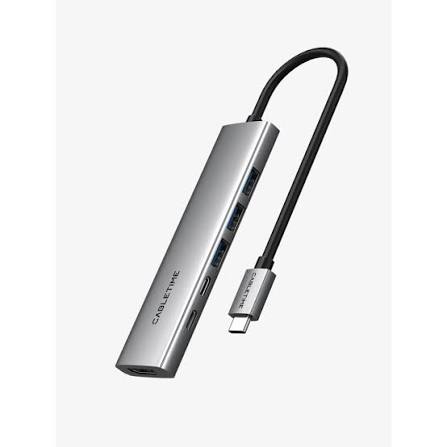
Modern laptops are becoming thinner, lighter, and more portable, but this design trend often comes with fewer built-in ports. Many computers now rely on USB-C connections for charging, data transfer, and external displays. Although this approach creates a cleaner design, it can become inconvenient when users need to connect several USB C hub with 100W PD accessories simultaneously. A USB-C hub with 100W Power Delivery (PD) offers a practical way to expand connectivity while keeping a workspace organized.
Whether you work from home, attend classes, travel frequently, or use multiple devices throughout the day, choosing the right USB-C hub can make a significant difference. The right model can connect monitors, keyboards, storage devices, and other peripherals while allowing a compatible laptop to receive power through the same connection.
However, not every hub provides identical performance. Port selection, charging capabilities, display support, build quality, and compatibility all influence the overall experience. Understanding these factors will help you choose a USB-C hub with 100W PD that matches your needs and budget.
Understanding a USB-C Hub with 100W PD
A USB-C hub is a compact accessory that expands the connectivity options of a computer or another compatible device. Depending on the model, it may provide USB-A ports, additional USB-C connections, HDMI output, Ethernet, SD card readers, and other interfaces.
Power Delivery is a charging technology that allows compatible devices and chargers to negotiate an appropriate level of electrical power.
What Does 100W Power Delivery Mean?
A hub advertised with 100W PD typically supports a power input of up to 100 watts through its designated USB-C charging port. This allows a compatible charger to supply power through the hub to a connected laptop.
However, the advertised 100W figure does not always mean the laptop receives the full 100 watts. Some power may be used by the hub itself, and actual output depends on its design, connected accessories, charger, cable, and the laptop’s requirements.
Before purchasing, check the manufacturer’s specifications to determine the maximum power delivered to the host device.
Why Is Power Delivery Useful?
Without Power Delivery support, users may need to connect a hub and laptop charger separately. A compatible PD hub can simplify this arrangement by combining charging and peripheral connectivity through one laptop connection.
This can reduce cable clutter and make it easier to connect accessories whenever you sit down at your desk.
Choose a Hub with the Right Ports
Port selection is one of the most important factors when comparing USB-C hubs. A product may look impressive, but it will not be useful if it lacks the connections required for your everyday devices.
USB-A Ports for Traditional Accessories
Many keyboards, mice, flash drives, and other accessories still use USB-A connectors. A hub with multiple USB-A ports can help users connect these devices without additional adapters.
If you frequently transfer files between external drives or use several wired accessories, consider how many ports you need and whether they support the required data-transfer speeds.
HDMI for External Displays
An HDMI port allows compatible laptops to connect to external monitors, televisions, and projectors. This feature is especially useful for presentations, multitasking, and creating a more comfortable desktop workspace.
Before buying, check the supported resolution and refresh rate. Some hubs support 4K output at 60Hz, while others have lower limits. The actual display capabilities also depend on the laptop’s USB-C functionality and the connected monitor.
Ethernet for Stable Internet Connectivity
Although Wi-Fi is convenient, a wired Ethernet connection can be useful for video meetings, large downloads, and other tasks where a stable network connection matters.
If you work in an office or use a desktop-style setup with a laptop, consider a hub that includes an Ethernet port.
SD and MicroSD Card Readers
Photographers, content creators, and students may benefit from integrated memory card readers. These ports make it easier to transfer files from compatible cameras and other devices without carrying separate readers.
Choose a hub that supports the memory card formats you use and offers suitable transfer speeds.
Check Compatibility with Your Laptop
Not every USB-C port supports the same functions. Some support charging and data transfer, while others also support video output through DisplayPort Alternate Mode or compatible Thunderbolt technology.
Confirm USB-C Port Capabilities
Before purchasing a hub, consult your laptop’s specifications. Confirm that its USB-C port supports the functions you intend to use, such as external displays, data transfer, and charging.
A hub cannot automatically add video output to a laptop port that lacks the necessary display capabilities.
Consider Your Operating System
Most standard USB-C hubs are designed to work with common operating systems, but certain features may vary by device.
Display configurations, multiple-monitor support, Ethernet functionality, and specialized software can differ between Windows laptops, Mac computers, Chromebooks, and tablets.
Review the hub manufacturer’s compatibility information to avoid unexpected limitations.
Understand Display and Data Performance
A USB-C hub can provide several useful connections, but its ports may share bandwidth. This means performance can vary when multiple devices operate simultaneously.
Choose Suitable Display Resolution
If you regularly work with spreadsheets, design software, presentations, or video content, display quality may be an important consideration.
Look for a hub that supports your monitor’s resolution and refresh rate. For example, a 4K monitor used for general productivity may work well with a compatible hub supporting 4K at 60Hz.
Users who need multiple external displays should check the maximum number of supported monitors and the specific operating-system limitations.
Look for Appropriate Data Speeds
USB ports support different data-transfer standards, and the presence of a USB-C connector does not guarantee the fastest available speed.
If you frequently transfer large video files or work with external solid-state drives, compare the hub’s stated transfer rates. For basic keyboard and mouse connections, lower data speeds may be perfectly adequate.
Consider Size, Build Quality, and Portability
The best hub should fit comfortably into your daily routine. A compact model may be ideal for travel, while a larger hub can provide more connections for a permanent workstation.
Compact Designs for Travel
Frequent travellers often benefit from lightweight hubs that fit easily into a laptop bag. A short integrated cable can reduce clutter, although its length should be suitable for your setup.
Consider the placement of the ports as well. Conveniently arranged connectors make it easier to attach accessories in crowded spaces such as airport lounges, classrooms, or shared offices.
Durable Materials and Cable Design
A well-built hub should withstand ordinary handling and regular transport. Look for a sturdy housing, dependable connectors, and a cable designed for frequent use.
Aluminium housings are common because they can provide a solid structure and help dissipate heat, but material alone does not guarantee superior performance.
Reading detailed product reviews can help you understand whether a particular model offers reliable construction and practical port placement.
Evaluate Heat Management and Safety
USB-C hubs may become warm during operation, particularly when charging a laptop, transferring large files, and connecting several peripherals simultaneously.
Some warmth can be normal, but the product should be designed to operate within appropriate temperature limits.
Choose a reputable manufacturer that clearly documents the hub’s supported power input, output limits, and safety protections. Use a compatible charger and cable, and avoid products with unclear specifications or questionable build quality.
It is also important to remember that a hub’s 100W PD rating describes its charging capabilities under specified conditions, not a guarantee of identical performance with every connected device.
Match the Hub to Your Daily Needs
Different users benefit from different combinations of ports and features. Thinking about your regular activities can help narrow the available options.
For Office Work and Remote Working
Office users may prioritize HDMI, Ethernet, several USB-A ports, and reliable laptop charging. These connections can support external monitors, wired accessories, and stable network access.
A hub with well-positioned ports can help maintain a tidy desk and simplify connecting or disconnecting a laptop.
For Students
Students may prefer a lightweight, affordable hub that supports external displays, USB accessories, and charging. A memory card reader can also be helpful for certain coursework and creative projects.
Choosing only the features you regularly use can prevent unnecessary spending.
For Content Creators
Photographers, video editors, and designers may require faster data transfer, memory card readers, and high-resolution display output.
Creators should carefully review the hub’s bandwidth limitations, since transferring large files while using several other connections can affect performance.
For Everyday Home Use
For browsing, streaming, online meetings, and connecting occasional accessories, a straightforward hub may be sufficient. There is little reason to pay extra for advanced features that do not support your actual workflow.
Compare Price, Warranty, and Reviews
Price should be considered alongside functionality and reliability. A low-cost hub may be suitable for basic tasks, while a more advanced model may provide faster ports, better display support, or additional connectivity.
Read reviews from multiple sources and look for specific details about charging performance, connection stability, compatibility, and heat management.
Check the warranty, return policy, and manufacturer’s support information before purchasing. These details can be particularly important if the hub will be used daily for work or study.
Conclusion
Choosing the best USB-C hub with 100W PD involves understanding your devices, connectivity requirements, and daily routine. A suitable hub can simplify laptop charging, expand available ports, support external displays, and reduce the need for separate adapters.
Start by checking laptop compatibility and confirming how much power the hub delivers to the connected computer. Then compare USB-A ports, HDMI capabilities, Ethernet, card readers, data-transfer speeds, and physical design.
For travel, portability may be the main priority. For office work, display support and network connectivity may matter more. Content creators may need faster data transfer and dependable card readers, while everyday users can often choose a simpler model.
Ultimately, the right USB-C hub is one that combines reliable charging, useful connectivity, and practical design without unnecessary expense. By comparing specifications carefully and checking trustworthy reviews, you can select a hub that makes working, travelling, and everyday technology use more convenient.