
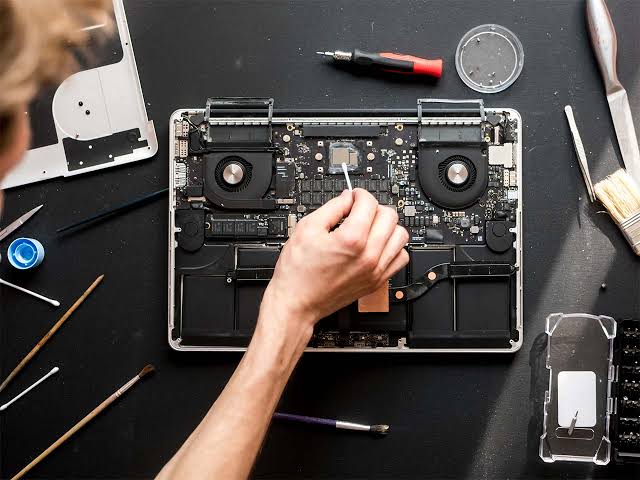
MacBooks are widely used for professional work, online meetings, entertainment, education, and creative projects. Their audio systems play an important role in delivering a smooth user experience, whether someone is listening to music, attending virtual meetings, recording a podcast, or watching videos. However, users may occasionally experience audio problems, such as distorted sound, low volume, microphone failures, crackling noises, or speakers that stop working completely. These issues can interrupt daily activities and reduce productivity. Fortunately, top MacBook repair and services can help identify the causes of audio problems and provide reliable solutions to restore sound quality.
Understanding Common MacBook Audio Problems
MacBook audio issues can develop for several reasons, including software conflicts, incorrect system settings, outdated operating systems, damaged speakers, and hardware malfunctions. Sometimes, the problem is minor and can be resolved through simple adjustments. In other situations, professional inspection may be necessary.
One common issue is the complete absence of sound. A MacBook may appear to be functioning normally, but videos, applications, and music produce no audio. Other users may experience sound that is unusually quiet, uneven, or interrupted by crackling and static.
Microphone problems are also common, particularly among people who frequently participate in online meetings. If the internal microphone fails to capture speech clearly, communication becomes difficult. Professional technicians can investigate these symptoms and determine whether they originate from software settings, connected accessories, or damaged components.
Identifying the Root Cause of Audio Failures
Finding the underlying cause is one of the most important steps in resolving MacBook audio problems. Replacing a component without proper testing can increase expenses while leaving the original issue unresolved.
Experienced technicians begin by asking about the symptoms, when they started, and whether the MacBook has recently experienced liquid exposure, physical damage, a software update, or an unexpected shutdown. This information helps narrow down the possible causes.
The diagnostic process may include checking sound output settings, testing internal speakers, examining microphone performance, reviewing system behavior, and connecting external audio devices. Technicians may also determine whether the issue affects every application or only one particular program.
By following a systematic diagnostic process, top MacBook repair and services can distinguish between software-related faults and physical component failures. This approach supports more accurate repairs and helps prevent unnecessary replacements.
Resolving Software-Related Sound Issues
Not every audio problem requires hardware repair. In many cases, incorrect settings or temporary software errors can interfere with normal sound output.
For example, a MacBook may send audio to Bluetooth headphones, an external monitor, or another connected device instead of its built-in speakers. Checking the sound output selection in System Settings can help resolve this situation. Users should also verify the volume level, mute status, and application-specific audio settings.
Restarting the MacBook may correct temporary system problems. Installing compatible macOS updates can also address certain software bugs and improve system stability. If audio fails only in one application, reviewing its permissions and audio preferences may be helpful.
Professional technicians can perform these checks when basic troubleshooting does not work. They can investigate software conflicts, review relevant system settings, and recommend appropriate corrective measures. This service is particularly useful for users who are unfamiliar with macOS troubleshooting or want to avoid making unnecessary system changes.
Repairing Damaged or Malfunctioning Speakers
MacBook speakers may become damaged through normal wear, accidental impact, liquid exposure, or internal component failure. Symptoms can include buzzing, crackling, distorted playback, or sound coming from only one side.
Although adjusting the volume may temporarily change the symptoms, persistent distortion can indicate a physical problem. Continuing to use damaged speakers without investigating the cause may affect the listening experience and make it difficult to determine whether other components are involved.
Professional repair services can inspect the speaker assembly, connectors, and related circuitry. Depending on the MacBook model and diagnostic findings, the technician may recommend repairing a connection or replacing a defective speaker component.
Quality service providers explain the available options before beginning the work. They should also clarify whether the repair involves original, compatible, or refurbished parts and describe any applicable warranty.
Choosing experienced technicians helps ensure that the repair is appropriate for the specific MacBook model. Proper reassembly and testing are equally important because internal components must be handled carefully during the repair process.
Fixing Microphone and Audio Input Problems
A functioning microphone is essential for video calls, voice recordings, online classes, and professional communication. When the microphone stops working, other people may hear nothing, experience unclear speech, or notice inconsistent audio levels.
The cause may be as simple as an application lacking microphone permission. It could also involve an incorrect input selection, an incompatible accessory, a software conflict, or a faulty internal microphone.
Technicians can test the microphone through system settings and suitable recording applications. They may review privacy permissions, confirm the selected input device, and check whether external microphones function correctly. If the internal microphone remains unresponsive, additional hardware diagnostics may be necessary.
Top MacBook repair and services can help users determine whether a microphone issue requires a settings adjustment, software correction, or component replacement. Resolving the problem improves communication quality and allows users to participate in meetings and recordings with greater confidence.
Addressing Bluetooth and External Audio Device Issues
Many MacBook users connect wireless headphones, speakers, microphones, and audio interfaces. These accessories provide flexibility, but connection problems can sometimes create confusion about where sound is being delivered.
Bluetooth interference, pairing errors, outdated accessory firmware, and incorrect output selection may cause audio interruptions or prevent a device from connecting. Wired accessories can also experience problems because of damaged cables, faulty adapters, or incompatible connections.
A technician can test the MacBook’s built-in audio separately from external devices to identify where the fault originates. They may recommend reconnecting the accessory, removing an old Bluetooth pairing, testing another cable, or checking compatibility.
If the built-in speakers work correctly but an external device does not, replacing MacBook hardware may be unnecessary. Accurate troubleshooting saves time and helps users avoid spending money on repairs they do not need.
Preventing Future MacBook Audio Problems
Preventive maintenance can reduce the likelihood of recurring audio difficulties. Users should keep their MacBooks clean, protect them from liquid spills, avoid excessive heat, and handle connected cables and accessories carefully.
Keeping macOS updated is another useful practice, provided updates are compatible with the device and important data is backed up beforehand. Users should also install applications from trustworthy sources and review microphone permissions when adding new software.
Regularly checking speaker performance, microphone quality, and connected accessories can help identify unusual behavior early. If crackling, intermittent sound, or unexplained audio failures persist, professional diagnosis is preferable to repeatedly changing settings without understanding the cause.
Repair specialists can also explain practical maintenance steps based on the device’s age, condition, and usage patterns. These recommendations may help extend the useful life of the MacBook and reduce the risk of avoidable problems.
Choosing the Right MacBook Repair Service
Selecting a reliable repair provider is important when audio problems require professional attention. Customers should look for technicians with relevant MacBook repair experience, transparent pricing, clear diagnostic procedures, and a willingness to explain the proposed solution.
Before approving a repair, users should ask about estimated costs, replacement-part quality, turnaround time, and warranty coverage. It is also helpful to confirm whether the provider has experience working with the specific MacBook model.
Data privacy deserves attention as well. Audio repairs do not usually require unrestricted access to personal files, so customers should ask why any requested access is necessary. Backing up important information before service is a sensible precaution whenever practical.
The best service provider focuses on solving the actual problem rather than automatically recommending expensive component replacements. Clear communication and thorough testing can make the repair process more predictable and convenient.
Conclusion
Audio problems can affect many aspects of MacBook use, from professional meetings and online learning to music, entertainment, and content creation. Although some issues can be resolved through simple software adjustments, persistent sound distortion, microphone failures, and damaged speakers may require expert attention.
Top MacBook repair and services help users identify the source of audio problems, choose suitable repair options, and restore reliable sound performance. Through careful diagnostics, appropriate software troubleshooting, professional hardware repairs, and preventive maintenance advice, experienced technicians can help reduce recurring issues and improve the overall user experience.
By responding to audio problems early and choosing a qualified repair provider, MacBook owners can protect their devices, maintain productivity, and enjoy clearer sound for everyday tasks.